See How NTS Finds Problems
Other Tools Can't Detect.
Real case studies. Problems that would have taken weeks to diagnose, solved in minutes with NTS. Each case shows the exact data that led to the solution.
These incidents are drawn from Outeniqua IT, our sister MSP, who have run NTS across their live client base since early development. Client sites are kept anonymous, but every chart, quote, and outcome is real.
"Devices performing non-optimally" - Wireless Link Bottleneck
Client site experiencing slow response times and intermittent connections across multiple devices behind a wireless link.
The Problem
Multiple devices showing degraded performance through wireless link connection.
What NTS Revealed
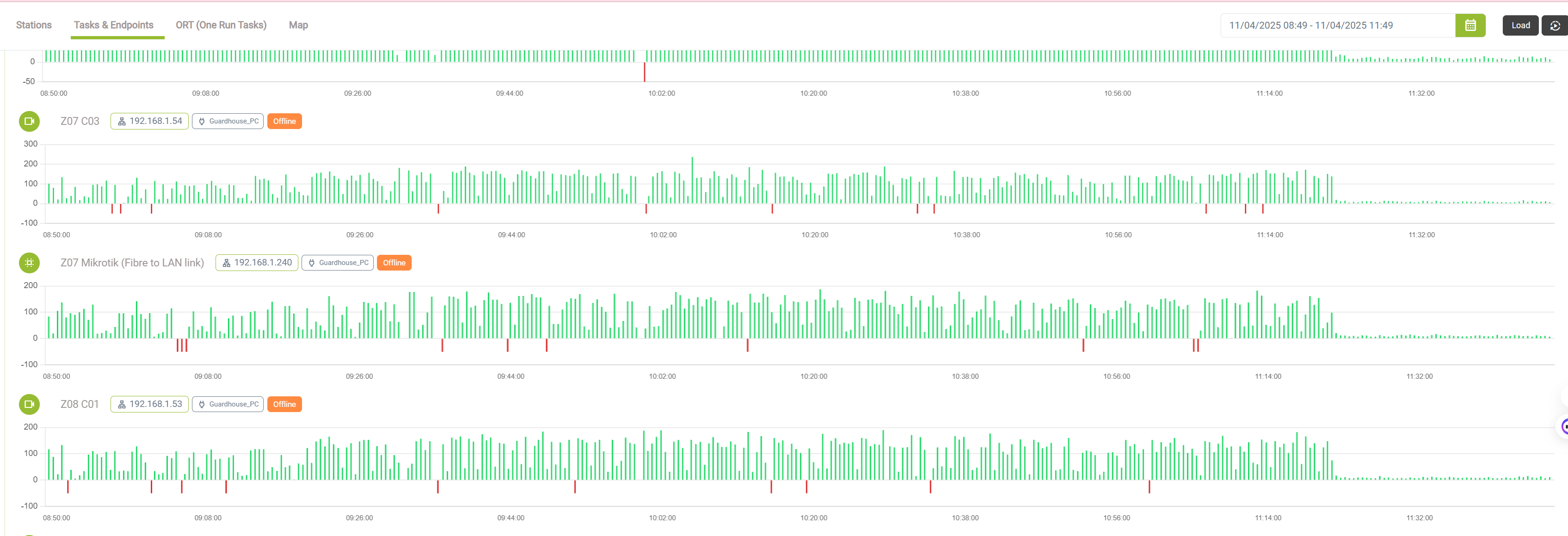
NTS monitoring identified that devices behind wireless link were experiencing performance degradation, with clear patterns showing the wireless link as the bottleneck.
Resolution & Time Saved
After rebooting the wireless link, we could visually see and confirm improvement on the network performance. NTS data clearly showed the wireless link was the bottleneck.
"We weren't sure exactly what was happening, as devices were erratic in live view and recordings. Turned out to be a low performing wireless link, and not actual NVR/camera setup."
"TITAN-CLOUD-SERVER stopped serving services" - 20 Minute Mystery
Critical cloud server went offline but was still accessible via VPN. NTS identified the exact cause and timeframe of the network failure.
The Problem
CLOUD-SERVER stopped serving services and checking in with NTS monitoring system. Server was accessible via VPN but not serving public services, creating a confusing partial outage scenario.
What NTS Revealed
NTS uptime monitoring clearly showed the exact outage period and helped identify the root cause.

Resolution & Time Saved
NTS data was shared with datacenter admins who quickly resolved the network egress issue. Precise timing helped identify the root cause immediately.
"On May 15, 2025, our TITAN-CLOUD-SERVER stopped serving services and checking in with our NTS monitoring system from 12:20 PM to 12:40 PM SAST, as shown in the NTS uptime chart. Despite this, I could still access it via VPN. Using NTS software, we pinpointed a public-facing network egress failure at the datacenter. We shared this insight with the admins, who resolved it quickly. Without NTS this would have been difficult to pinpoint, or we might have even missed it as it was in the early hours of the morning."
"Multiple devices down simultaneously" - Switch Failure Pattern
Multiple network devices going offline at exactly the same time, then recovering together. Individual device troubleshooting was wasting hours.
The Problem
Multiple devices across the network segment experiencing simultaneous connectivity failures. IT team was troubleshooting individual devices, missing the pattern that all failures were synchronized.
What NTS Revealed
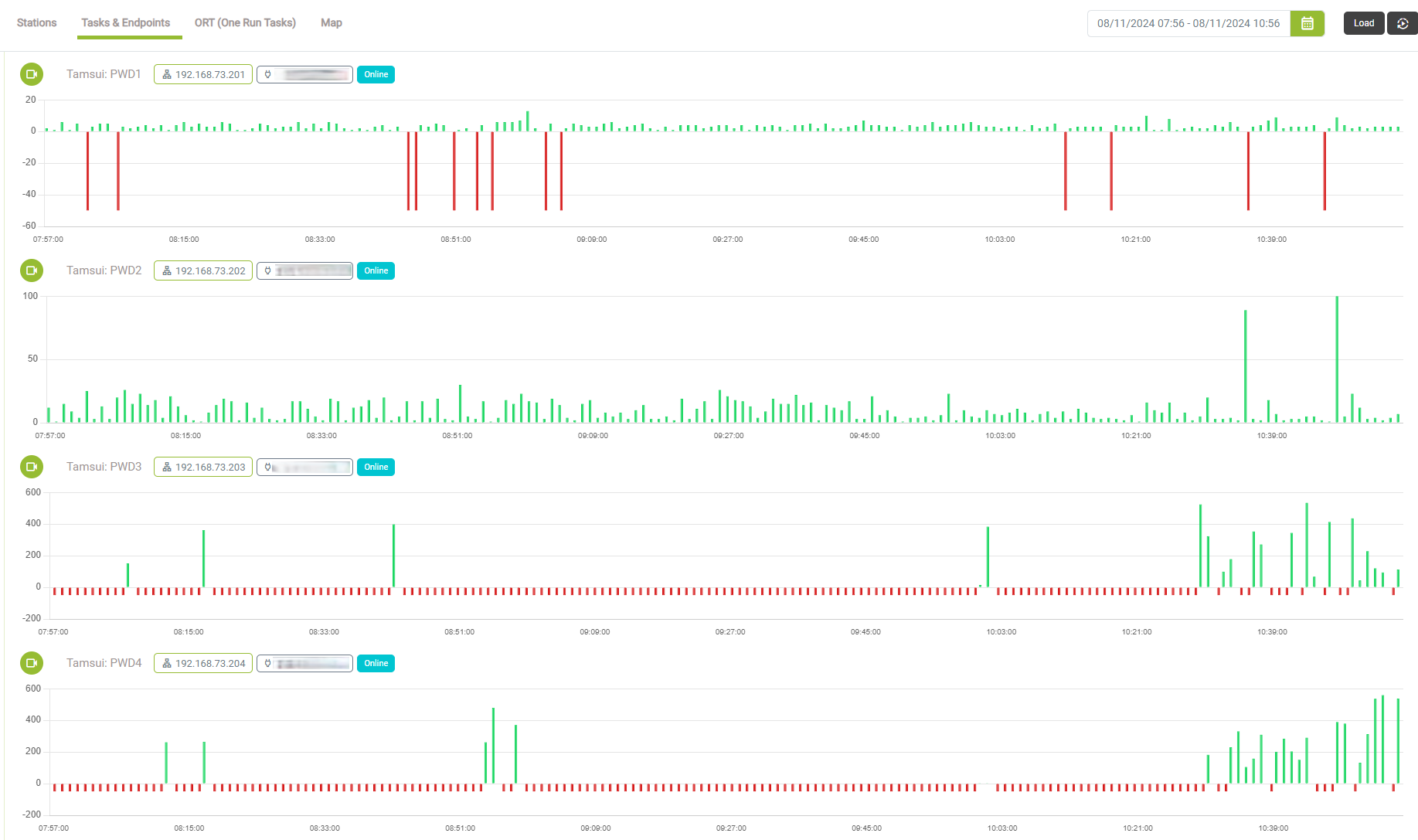
NTS monitoring clearly showed all devices dropping at exactly the same time - impossible coincidence pointing to switch-level failure.
Resolution & Time Saved
NTS data clearly showed switch-level issue, allowing immediate switch replacement instead of continued individual device troubleshooting.
"We were troubleshooting individual devices for days. NTS showed us immediately that all devices were failing at the same time - obviously a switch issue, not 20 separate device problems."
"Camera unstable but online" - Missing Recordings Mystery
Camera sometimes unstable with missing recordings, but when investigated appeared online and making recordings. Client reported recordings that should be there weren't available.
The Problem
Camera showing intermittent instability with missing recordings despite appearing online and functioning when checked. Client reported recordings that should exist weren't available, but camera showed live view and recordings during investigation.
What NTS Revealed
NTS monitoring discovered the camera had a cycle of degradation, clearly repeated on the time series charts. Performance gradually declined over days until next reboot was needed.

Resolution & Time Saved
NTS data clearly showed the degradation pattern, leading to firmware update that fixed the memory leak. Camera proved to be stable after firmware update with no more missing recordings.
"Camera was unstable but online with missing recordings. NTS showed us the degradation cycle pattern. We could see the camera was "falling over" as time passed. We suspected a memory leak. After firmware update to fix memory leak, camera has been stable with no more missing recordings."
"Pool drowning incident" - Critical Event Verification
Serious incident at private resort pool requiring investigation to determine if cameras recorded appropriately and if system integrity was maintained.
The Problem
Person drowned in freely accessible pool at private resort. Person could be seen entering pool and clinging to side. Critical questions arose: Why wasn't the drowning event recorded? Did someone tamper with cameras? Was camera integrity compromised?
What NTS Revealed
NTS historical uptime charts for specific camera showed 100% availability during the actual drowning event period, confirming system integrity. Critical note: Without NTS, we would not have been able to confirm camera availability or motion detection effectiveness during this critical investigation.

Resolution & Time Saved
NTS data provided definitive evidence of camera performance, eliminating speculation about equipment failure or tampering. Motion detection sensitivity was increased for future prevention.
"NTS was already running and provided critical data. It took 5 minutes to pull the charts and confirm camera was at 100% uptime during the drowning incident. The drowning event wasn't recorded, likely because the person was already underwater when motion detection should have triggered. We answered questions about foul play - camera integrity was intact, no tampering. Motion detection sensitivity was increased to prevent future similar incidents."
"Staff member struggling to work" - Underspec Equipment
Laptop triggered warnings for higher than normal CPU average across hours. No specific processes stood out, just consistently high CPU usage affecting productivity.
The Problem
NTS detected higher than normal CPU average on staff laptop across multiple hours. No specific processes causing spikes, just overall high CPU usage indicating performance bottleneck.
What NTS Revealed
NTS monitoring showed consistently high CPU usage patterns across hours, indicating laptop was underpowered for work being performed.
Resolution & Time Saved
Client contacted staff member who confirmed struggling with work. Company owner immediately ordered new laptop. Problem solved, one the owner didn’t even know existed.
"Laptop triggered warnings for higher than normal CPU average. No specific processes popped out. We contacted client, staff confirmed she's really battling to work. Laptop just not powerful enough for work she was doing. Company owner immediately ordered new laptop. We told owner about a problem he didn't know existed."
"Irregular GPU usage" - Cryptocurrency Mining
High sustained GPU usage detected on workstation. Irregular patterns suggested gaming or cryptocurrency mining rather than normal business operations.
The Problem
NTS detected high sustained GPU usage on workstation with irregular patterns not typical of business applications. Either staff member gaming or cryptocurrency mining.
What NTS Revealed
NTS GPU monitoring detected irregular high usage patterns inconsistent with normal business operations, indicating potential unauthorized activity.
Resolution & Time Saved
Informed company owner, investigated workstation, discovered bitcoin mining equipment. Client requested removal as part of MSP maintenance contract.
"High sustained GPU usage. Irregular GPU usage... either staff member was gaming at work, or they were bitcoin mining etc. We informed company owner, they asked us to investigate, and bitcoin mining equipment was discovered. Client requested us to remove this as part of our MSP maintenance contract."
"Wireless performance inconsistent" - Link Performance Mystery
Wireless connections showed good signal-to-noise ratio, devices were online, network links didn't drop, but performance remained irregular and inconsistent despite reasonable throughput.
The Problem
Wireless link showed good signal-to-noise ratio with devices staying online and network links not dropping, but performance remained irregular and inconsistent. Standard wireless tools showed reasonable throughput, but actual performance just couldn't be optimized.
What NTS Revealed
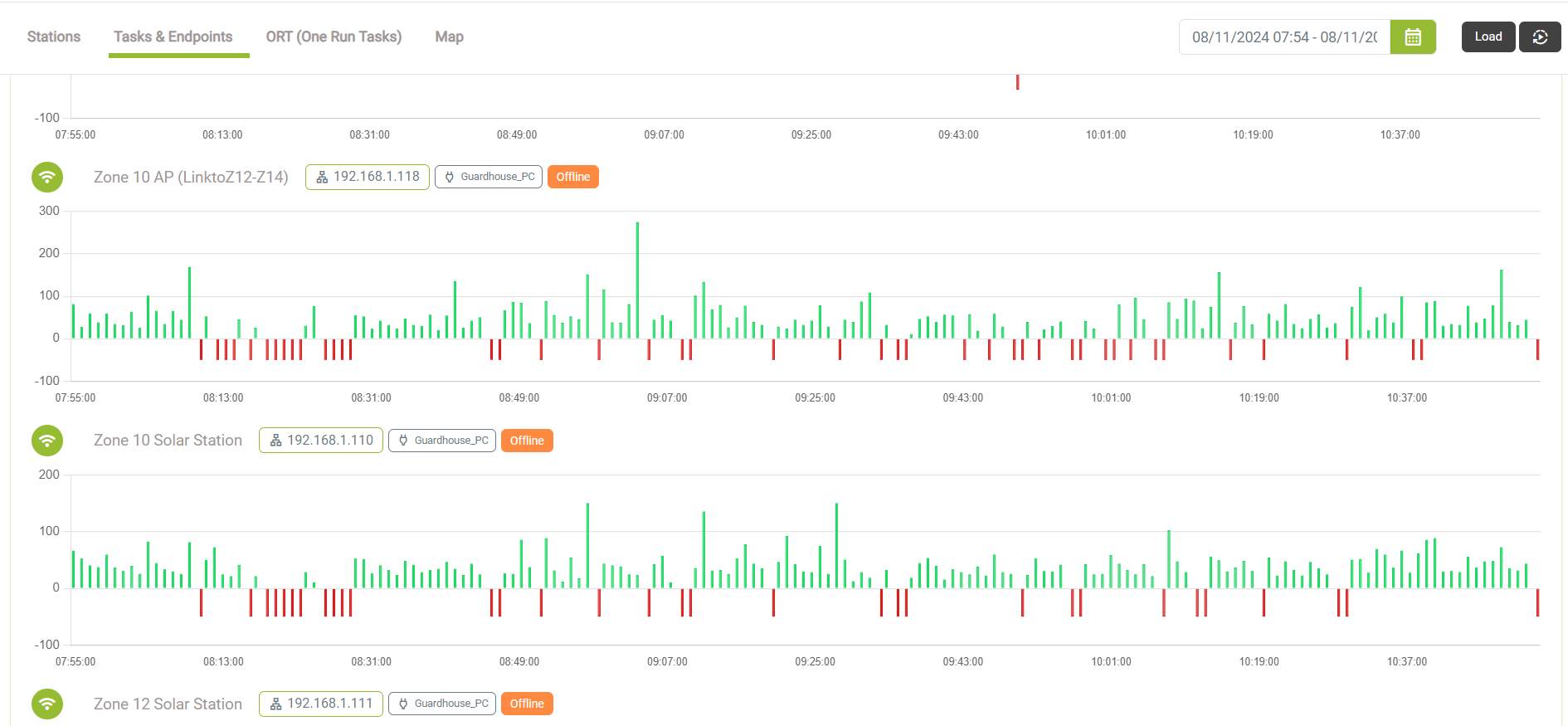
NTS monitoring captured the inconsistent performance patterns despite good wireless metrics, showing the real-world impact on connected devices.
Resolution & Time Saved
Ended up rebuilding entire wireless link with new transport and center frequencies. NTS data allowed us to visually see how networked devices behind link improved after rebuild.
"Wireless showed good signal-to-noise ratio, devices stayed online, but performance was inconsistent. Standard tools showed reasonable throughput but we just couldn't get performance right. Ended up rebuilding wireless link with new transport and center frequencies - we could visually see how networked devices behind link improved."
"Hidden POE switch failure" - Proactive Issue Detection
Devices were online and functioning for most part, but NTS monitoring revealed warnings that led to discovery of faulty POE switch on specific segment.
The Problem
Devices were online and functioning for most part. No one reported an issue and We didn't actively look for this. NTS monitoring showed warnings that prompted investigation.
What NTS Revealed
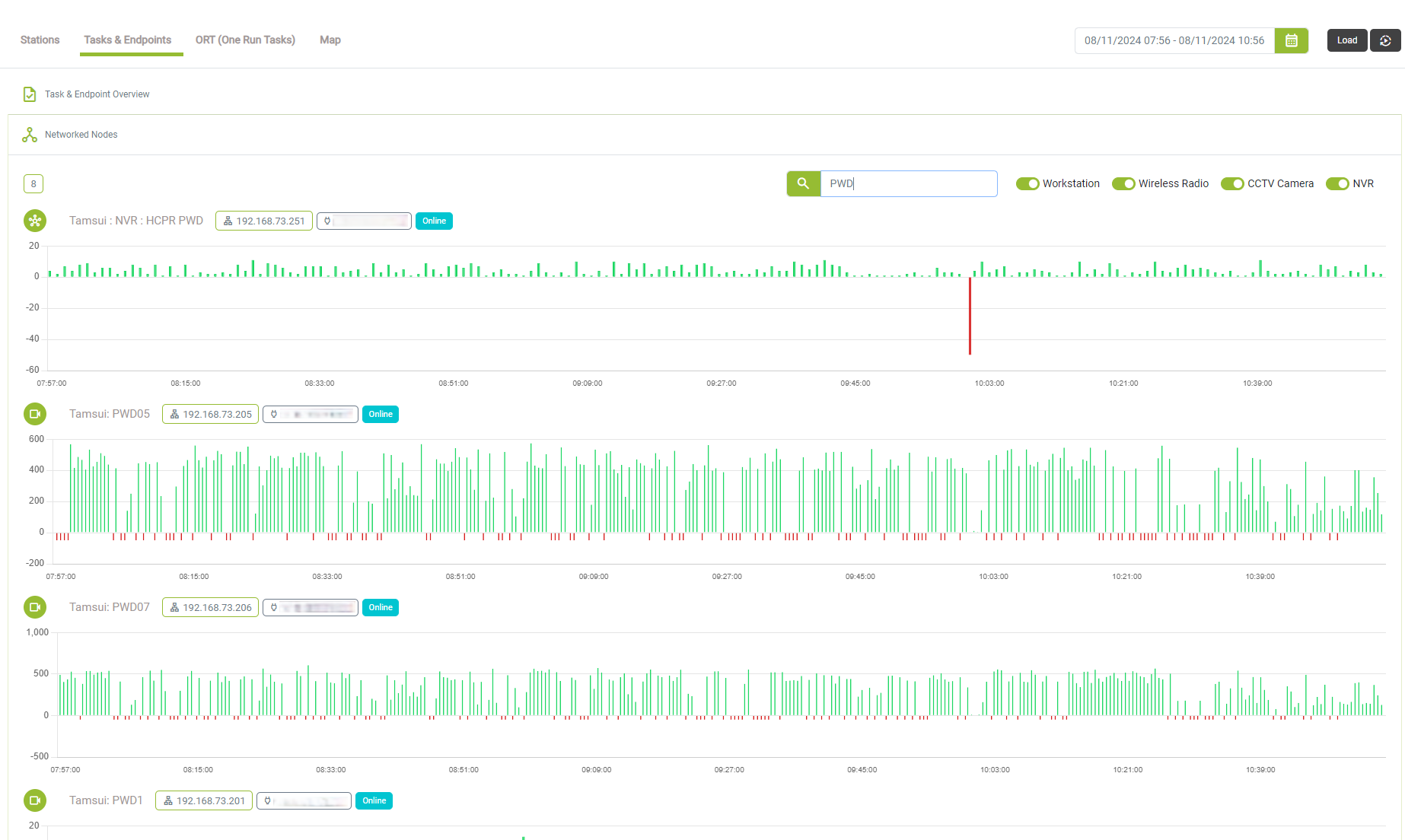
NTS endpoint monitoring detected warnings that traced to faulty POE switch on specific network segment. Cable runs were quite long and switch probably underperformed.
Resolution & Time Saved
Issue was resolved before client reported any problems. NTS monitoring enabled proactive detection and resolution of POE switch failure.
"Devices were online and functioning, but NTS showed warnings we didn't know existed. Traced to faulty POE switch on specific segment. Cable runs were long and switch underperformed. Issue resolved before client even reported it."
"PC extremely slow certain times" - Backup Software Impact
User reported PC extremely slow at certain times of day only. Investigation revealed backup software causing hard drive read/write spikes during scheduled backup windows.
The Problem
User reported PC extremely slow at specific times of day. Investigation found hard drive read/write spiking at certain times due to backup software operations.
What NTS Revealed
NTS performance monitoring identified backup software as the cause of hard drive spikes at specific times, when PC was used as network share for staff backups.
Resolution & Time Saved
Identified issue immediately with NTS. Advised client to use NAS backup appliance, but client declined. Could pinpoint and discuss issue when support call came in.
"User reported PC extremely slow certain times of day only. Found hard drive read/write spiking at certain times. Investigated processes over exact time period, found backup software. Client uses this PC as network share, all staff backup to this share, then backed up to cloud. All normal behaviour, but we spotted issue almost immediately. Advised client to use NAS, client did not approve, situation continued."
"HDD queue length alerts" - Failure Prediction
NTS received triggers for HDD queue length on workstation. High queue length is precursor to SSD or mechanical hard drive failure.
The Problem
NTS received HDD queue length triggers on workstation. High queue length indicates impending drive failure, even when no read/write data showing.
What NTS Revealed
NTS monitoring showed HDD queue length patterns over time, indicating impending failure even when no actual read/write data was present during monitoring periods.
Resolution & Time Saved
Contacted client who confirmed extremely slow PC performance. Replaced HDD before complete failure. User and client happy with proactive resolution.
"We received triggers in HDD queue length for a workstation. We've learned that high queue length is a precursor to SSD or mechanical hard drive failure. With NTS we could see exactly over time what the HDD queue length looked like, even when charts showed no actual read or write data. We contacted client, they immediately informed 'yes, my PC has been extremely slow these last few days'. We replaced the HDD, all smiles, user and client happy. Replaced HDD before it failed completely."
"Maintenance unplugged cameras" - Critical Production Alert
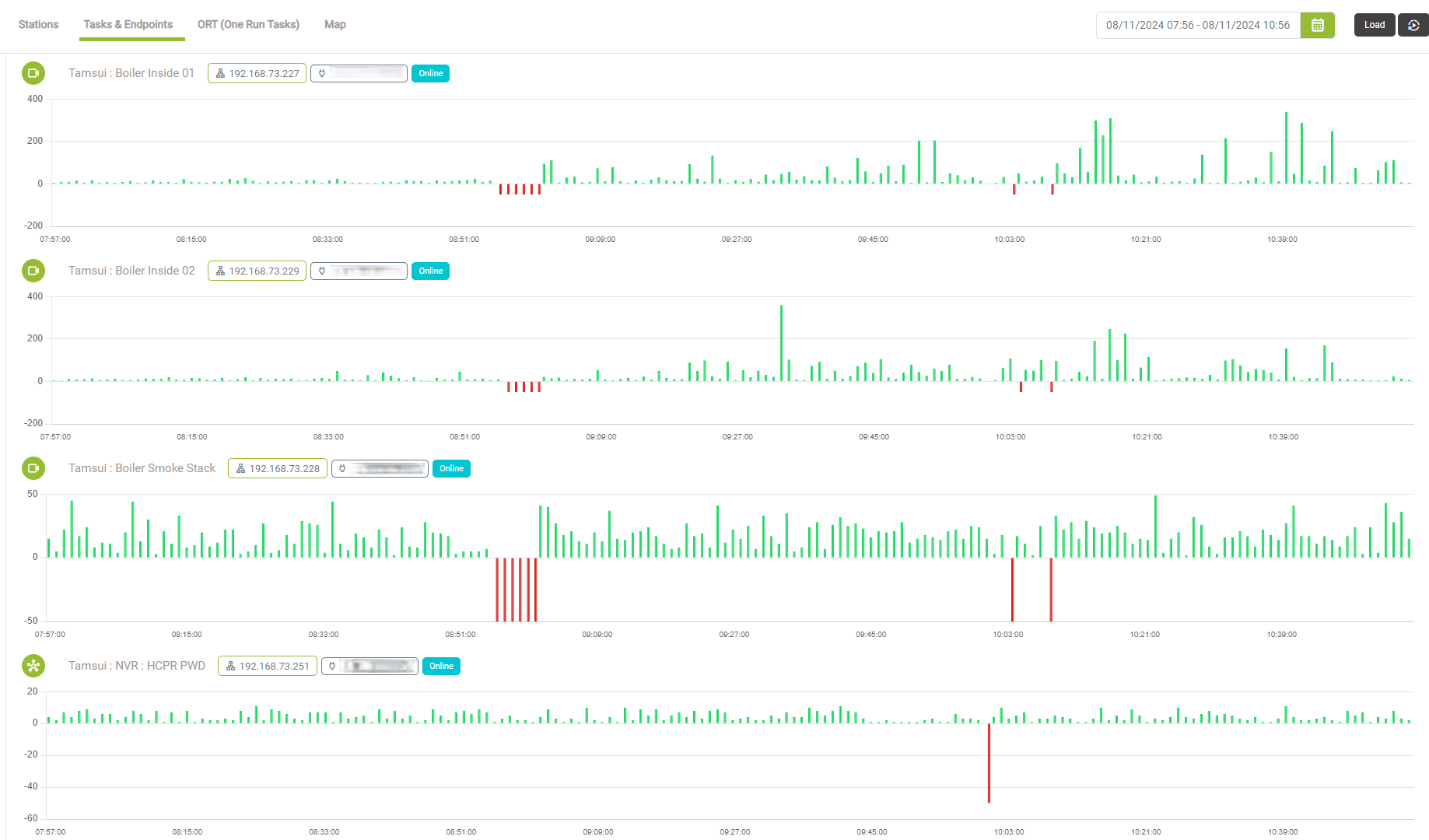
Three devices produced offline warning notifications during crucial production cycles, later discovered to be maintenance workers unplugging POE equipment for ceiling repairs.
The Problem
Three devices produced offline warning notifications, later restored. Investigation revealed maintenance workers in ceilings unplugged crucial POE equipment to plug in tools while making repairs.
What NTS Revealed
NTS monitoring detected offline warnings for 3 devices and provided critical alerts during production cycles, enabling immediate investigation.
Resolution & Time Saved
NTS provided critical alerts to client during maintenance work. Without NTS, cameras would have been down during crucial production cycles with no awareness.
"Three devices produced offline warnings during crucial production. Maintenance workers unplugged POE equipment for ceiling repairs. Without NTS, we wouldn't have alerted client, and worse - if something happened on site, we never would have known cameras were down for 10 minutes during crucial production cycles."
Find Problems Before Your Clients Do
NTS gives you the data to solve issues that other tools can't even detect. Start your free trial and see what you've been missing.